With the explosive adoption of AI coding assistants like GitHub Copilot, Gemini, and Cursor, software engineering is moving faster than ever. However, this productivity boost comes with a hidden legal landmine: the risk of losing patent protection.
Under the USPTO's active Revised Inventorship Guidance, AI is legally treated strictly as a tool (analogous to a software compiler or a scientific database). The USPTO has clarified that the traditional Pannu factors (often cited in earlier guidelines) apply only to joint inventorship among multiple natural persons. Instead, the USPTO relies entirely on the traditional Conception Test to evaluate AI-assisted inventions. The sole question is whether the human inventor formed a "definite and permanent idea of the complete and operative invention" in their own mind.
If a dev team uses AI to generate core algorithms without keeping a record of how the human guided, filtered, and refined those outputs, patent examiners or litigation opponents can argue the human did not conceive the invention, but merely recognized a good result generated by the AI on its own.
This guide outlines a technical compliance framework for engineering teams to build a verifiable "AI interaction audit trail"—the modern equivalent of the classic developer's lab notebook to prove human conception.
#1. Proving Conception in the Age of AI
To satisfy the USPTO Conception Test when using generative tools, you must show that a human inventor performed the actual intellectual act of conception rather than simple selection:
- Formulating the Architecture & Constraints: You must document that you designed the specific system layout, defined unique boundary conditions, and set the strict rules before the AI generated the code.
- Iterative Problem Solving: If the AI output fails or is incomplete, your logs must show how you identified the issues, designed new prompts, and guided the tool step-by-step toward the operative solution.
- Refinement & Verification: The developer must show that they integrated, debugged, and modified the raw AI outputs to work within the larger proprietary architecture, proving the final system was realized under human direction.
To satisfy a patent attorney, developers must be able to prove this cognitive pathway occurred.
#2. Implementing an Automated AI Interaction Logger
Relying on developers to manually copy-paste their LLM prompts into a text file is a recipe for failure. Instead, engineering teams should integrate logging into their custom development workflows or agentic loops.
Here is a Python utility that intercepts developer prompts, model outputs, and metadata (system configuration, seed values, and user details) and saves them in a cryptographically signed, git-friendly audit trail:
import json
import time
import hashlib
from typing import Dict, Any

class AILogbook:
    def __init__(self, output_path: str = "ai_inventorship_log.jsonl"):
        self.output_path = output_path

    def _generate_record_hash(self, record: Dict[str, Any]) -> str:
        # Create a deterministic SHA-256 hash of the transaction metadata
        serialized = json.dumps(record, sort_keys=True)
        return hashlib.sha256(serialized.encode('utf-8')).hexdigest()

    def log_interaction(self,
                        developer_email: str,
                        system_prompt: str,
                        user_prompt: str,
                        model_name: str,
                        model_output: str,
                        parameters: Dict[str, Any],
                        git_commit_hash: str) -> str:

        timestamp = time.time_ns()

        # Build the record structures for legal review
        record = {
            "timestamp_ns": timestamp,
            "developer_email": developer_email,
            "model_config": {
                "model_name": model_name,
                "parameters": parameters
            },
            "human_inputs": {
                "system_instructions": system_prompt,
                "user_prompt": user_prompt
            },
            "ai_output": model_output,
            "context": {
                "target_git_commit": git_commit_hash
            }
        }

        # Cryptographic link to prevent tampering
        record["record_hash"] = self._generate_record_hash(record)

        # Append to a structured audit file
        with open(self.output_path, "a") as f:
            f.write(json.dumps(record) + "\n")

        return record["record_hash"]

# Example usage within a developer tool or IDE extension:
logbook = AILogbook()
log_id = logbook.log_interaction(
    developer_email="dev@company.com",
    system_prompt="You are a real-time data compression assistant. Use a modified LZW compression logic constrained to 8-bit memory cells.",
    user_prompt="Draft the byte packing routine for the optimized dictionary in Python.",
    model_name="gemini-3.1-pro",
    model_output="def pack_bytes(dictionary):\n    # ... AI generated code ...",
    parameters={"temperature": 0.2, "seed": 482910},
    git_commit_hash="9cf82e1d7a8b8c2d9e0f31a2b3c4d5e6f7a8b9c0"
)

print(f"Logged transaction with ID: {log_id}")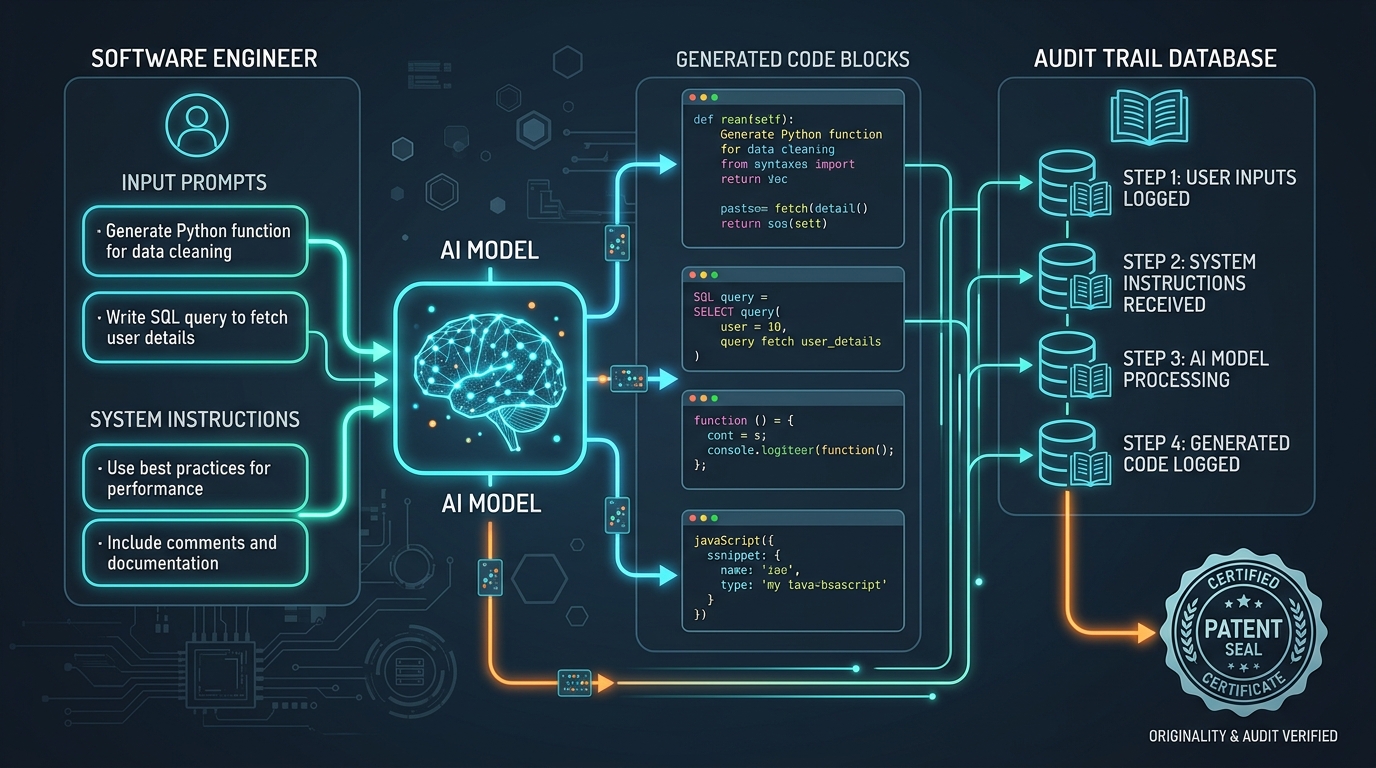
Prompt example
Gemini 3.1 Pro
A technical diagram in a clean, dark futuristic theme showing a software engineer's input prompts and system instructions feeding into an AI model, outputting code blocks. An audit trail database logs each step, connected by glowing lines to a patent certificate seal.
Aspect
16:9
Stylize
Clean Diagram
Seed
928304918
#3. Git Commit Strategies for Patent Trail Security
In addition to keeping JSON records, your development workflow should link code modifications directly to specific AI-assisted sessions:
- Branch Isolation: Create feature branches specifically designated for AI experimentation.
- Commit Hooks: Configure local git hooks to prompt developers to tag commits that contain significant AI-generated segments (e.g.,
git commit -m "Add LZW compression parser [AI-Assisted] [Refined: Human custom byte-alignment]"). - Code Annotations: Use inline code comments to mark blocks of code that were AI-generated but human-refined:
python
# [PATENT NOTE: Conception by Human / Synthesized by Gemini 3.1 Pro]
# Human defined constraint: 8-bit limit. AI generated loop structure.
# Refined by Human on 2026-07-07 to fix buffer overflow condition.
#4. The Checklist for Legal and Patent Counsel
When your patent attorney prepares to draft a software patent application, having these assets pre-organized will save thousands of dollars in billable hours:
- Prompt Manifest: A complete chronological log of prompts showing how the human formulated the problem, which parameters were selected, and how the prompts evolved.
- Diff History: Git diffs showing the raw AI output side-by-side with the developer's finalized, debugged production code. This proves human verification, refinement, and custom implementation.
- System Prompt Templates: The core templates used to restrict model behaviors, which demonstrate the architectural limitations the human imposed on the machine.
By adopting a structured logging pipeline, enterprise engineering teams can continue leveraging AI at full speed while guaranteeing that their intellectual property remains fully defensible and patentable in the courtroom.
Written by
Pete Overdrive
Workflow editor
Writes practical guides on model APIs, retrieval systems, structured output, and agent workflows.
Contact editor